
Anúncios
The era of 5G connectivity has arrived, promising download speeds that were once unimaginable and a browsing experience that redefines what we expect from mobile internet. 📱


If you’ve recently purchased a smartphone or checked your device specifications, you might have noticed that your phone is 5G-capable. However, simply having a 5G-compatible device doesn’t automatically mean you’re experiencing those lightning-fast speeds everyone talks about. There’s a crucial activation process, and understanding how to properly enable and optimize 5G on your device can make the difference between frustrating buffering and seamless streaming.
Anúncios
Many users remain unaware that their phones aren’t automatically configured to take full advantage of 5G networks. Whether you’re using an Android device or an iPhone, specific settings need adjustment, and certain conditions must be met before you can truly harness the power of fifth-generation wireless technology.
🔍 Understanding What 5G Really Means for Your Daily Usage
Before diving into activation procedures, it’s essential to understand what 5G actually offers beyond marketing buzzwords. Fifth-generation wireless technology represents a fundamental leap forward in mobile connectivity, offering speeds that can theoretically reach up to 10 gigabits per second – that’s approximately 100 times faster than 4G LTE.
Anúncios
However, real-world speeds vary significantly depending on several factors including your carrier, location, network congestion, and the specific type of 5G technology deployed in your area. There are actually three distinct types of 5G networks: low-band, mid-band, and high-band (also known as mmWave), each with different characteristics regarding speed and coverage.
Low-band 5G offers wide coverage but speeds only marginally better than advanced 4G. Mid-band provides a balanced combination of speed and coverage, while mmWave delivers those incredible multi-gigabit speeds but with limited range and building penetration. Understanding which type is available in your location helps set realistic expectations.
✅ Confirming Your Device Actually Supports 5G Technology
Not all smartphones advertised as “5G-ready” support all frequency bands or 5G variants. Before attempting activation, verify your specific device model’s capabilities. Manufacturers often release different versions of the same phone model for different markets, with varying 5G band support.
To check your device compatibility, navigate to your phone’s settings menu and look for “About Phone” or similar option. Here you’ll find your exact model number, which you can cross-reference with manufacturer specifications online. Pay particular attention to which 5G bands your device supports and compare these with what your carrier offers in your region.
Additionally, ensure your device is running the latest software version, as manufacturers frequently release updates that improve 5G connectivity, fix bugs, and optimize battery consumption when using faster networks.

📲 Step-by-Step Activation Process for Android Devices
Activating 5G on Android smartphones varies slightly between manufacturers due to custom user interfaces, but the general process remains consistent across most devices. Here’s how to enable this feature on your Android phone:
First, open your Settings app and navigate to “Connections” or “Network & Internet” depending on your device manufacturer. Look for “Mobile Networks” or “Cellular Networks” and tap to access these settings.
Within this menu, you should see an option labeled “Network Mode,” “Preferred Network Type,” or something similar. Tap this option to view available network configurations. Select the option that includes 5G – this might read as “5G/LTE/3G/2G (auto connect),” “5G On,” or “5G/4G/3G Auto.”
Some manufacturers like Samsung include additional 5G settings. Look for an option specifically labeled “5G Network Mode” where you can choose between “5G On” for constant 5G connectivity or “5G Auto” which intelligently switches between 4G and 5G to preserve battery life.
🔧 Advanced Android Configuration Options
Power users can access even more granular control through developer options on certain Android devices. While not necessary for basic 5G activation, these settings allow you to lock onto specific band configurations or force your device to prioritize 5G connections.
To access developer options, go to “About Phone,” find “Build Number,” and tap it seven times rapidly. This unlocks the developer menu in your settings. Within developer options, look for “Set Preferred Network Type” or similar options that provide additional control over cellular connectivity.
Be cautious when modifying these advanced settings, as incorrect configurations might actually worsen your connection quality or increase battery drain significantly.
🍎 Enabling 5G on iPhone Devices
Apple’s approach to 5G implementation emphasizes simplicity and intelligent automation, though manual controls are available for users who want more direct management of their connectivity.
On iPhone 12 and newer models running iOS 14 or later, open the Settings app and select “Cellular” or “Mobile Data.” Tap “Cellular Data Options” followed by “Voice & Data.” Here you’ll see three options related to 5G connectivity.
“5G Auto” is Apple’s recommended setting, which intelligently balances speed and battery life by automatically switching between 5G and LTE based on your activity and network conditions. This mode activates 5G for demanding tasks like streaming high-definition video or downloading large files while reverting to LTE for basic browsing and email.
“5G On” forces your iPhone to use 5G whenever it’s available, regardless of the battery impact. This ensures you’re always getting maximum speeds but will noticeably reduce battery longevity throughout the day.
The third option, “LTE,” disables 5G entirely if you prefer to prioritize battery life or if 5G coverage in your area is spotty and causes connection instability.
📡 Verifying Your Carrier and Plan Compatibility
Having a 5G-capable device with properly configured settings means nothing if your cellular plan doesn’t include 5G access. Many carriers require specific plan tiers or additional fees to access their 5G networks, even if you have compatible hardware.
Contact your carrier or check your account through their mobile app or website to confirm your current plan includes 5G service. Some carriers automatically upgraded existing customers to 5G-compatible plans, while others require manual plan changes or upgrades.
Additionally, verify that your SIM card supports 5G technology. Older SIM cards might need replacement even if your device and plan both support 5G. Most carriers will provide updated SIM cards free of charge to 5G-compatible device owners.
💳 Upgrading Your SIM for Maximum Compatibility
Modern 5G networks increasingly utilize eSIM technology alongside traditional physical SIM cards. If your device supports eSIM, consider activating a 5G plan through this digital option, which often provides faster provisioning and easier carrier switching.
Visit your carrier’s retail location or contact customer service to request a 5G-compatible SIM or eSIM activation. Bring proper identification and your device to ensure seamless setup. The process typically takes only minutes, and representatives can confirm successful 5G activation before you leave.
🗺️ Checking 5G Coverage in Your Area
Even with everything properly configured, you won’t experience 5G speeds if you’re not in a coverage area. Carrier coverage maps provide valuable information about 5G availability in your region, though real-world coverage often differs from these idealized representations.
All major carriers provide online coverage maps on their websites. These maps typically distinguish between different 5G types (low-band, mid-band, mmWave), allowing you to understand what kind of performance to expect in various locations.
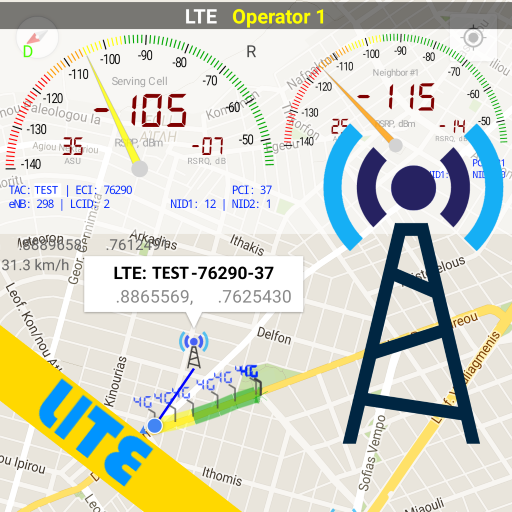
Third-party applications can also help you identify 5G coverage and even show which specific towers and bands your device is connecting to in real-time. These apps provide far more detailed information than carrier maps and reflect actual user experiences rather than projected coverage.
⚡ Optimizing Your Device for Maximum 5G Performance
Successfully activating 5G is only the beginning. Several optimization techniques can enhance your experience and ensure you’re getting the absolute best performance from your connection.
First, position matters significantly, especially with mmWave 5G. These high-frequency signals have difficulty penetrating buildings and obstacles. For maximum speeds, position yourself with clear line-of-sight to cell towers when possible, particularly near windows when indoors.
Regularly restart your device to clear cached network data and refresh connections. This simple action resolves many connectivity issues and can help your phone establish better 5G connections, especially after traveling between different coverage areas.
Monitor which apps consume the most data and leverage 5G speeds strategically. Download large files, update applications, and sync cloud storage when connected to 5G networks to take full advantage of increased bandwidth.
🔋 Managing Battery Life on 5G Networks
One significant trade-off of 5G connectivity is increased power consumption. The radios required for 5G communication, particularly when seeking signals or switching between 4G and 5G, drain batteries faster than traditional LTE connections.
To balance speed with battery longevity, use your device’s automatic 5G settings when available. These intelligent modes activate 5G only when needed for bandwidth-intensive tasks while maintaining LTE connections for routine activities.
Enable battery saver modes during extended periods away from chargers, as these typically restrict background 5G usage and limit connectivity to essential functions. You can also manually switch to LTE-only mode in settings when maximum battery conservation becomes necessary.
🛠️ Troubleshooting Common 5G Activation Problems
Despite following all activation steps correctly, some users encounter persistent issues preventing proper 5G functionality. Understanding common problems and their solutions saves frustration and support call time.
If your phone shows 5G indicators but speeds remain disappointingly slow, you might be connected to low-band 5G networks that offer only marginal improvements over LTE. This isn’t a malfunction but rather the limitation of that particular 5G variant. Check carrier coverage maps to identify where faster mid-band or mmWave coverage exists.
Connection instability or frequent switching between 4G and 5G typically indicates you’re on the edge of 5G coverage. In these scenarios, manually selecting LTE-only mode often provides more consistent, reliable service than constantly fluctuating 5G connections.
If 5G options don’t appear in your network settings despite having a compatible device, your carrier settings might need updating. Navigate to your device’s software update section and specifically check for carrier updates, which are separate from operating system updates.
📞 When to Contact Technical Support
If you’ve exhausted troubleshooting steps without success, contact your carrier’s technical support. Have your device information, plan details, and specific error messages ready. Support representatives can remotely check provisioning, verify network settings, and identify account-specific issues preventing 5G access.
Sometimes the problem resides in network infrastructure rather than your device. Carriers continuously expand and optimize their 5G networks, and occasional disruptions during maintenance windows can temporarily affect service quality.
🌐 What to Expect from Your 5G Experience
Setting realistic expectations ensures satisfaction with your newly activated 5G connection. While marketing materials showcase incredible potential speeds, real-world performance depends on numerous variables beyond your control.
In optimal conditions with mmWave 5G, you might experience download speeds exceeding 1 Gbps, allowing you to download a full-length HD movie in seconds. More commonly, mid-band 5G provides speeds between 100-400 Mbps – still dramatically faster than typical LTE but not quite the multi-gigabit speeds advertised.
Beyond raw speed, 5G offers significantly reduced latency, meaning less delay between sending requests and receiving responses. This improvement proves particularly noticeable in real-time applications like video calls, online gaming, and interactive applications where responsiveness matters as much as bandwidth.
Network congestion affects 5G performance just like any wireless technology. During peak usage times in densely populated areas, speeds can decrease substantially even on 5G networks. Early morning and late evening typically offer the best performance due to reduced network load.

🚀 Future-Proofing Your Mobile Experience
Activating 5G today positions you at the forefront of mobile technology evolution. As networks mature and expand, your experience will continuously improve without requiring device changes or additional configuration.
Carriers are rapidly deploying more cell sites and expanding mid-band coverage, which provides the best balance of speed and coverage. Over the next few years, 5G availability will approach and eventually surpass current LTE coverage, making fast connections available almost everywhere.
New applications and services specifically designed to leverage 5G capabilities are emerging constantly. From cloud gaming platforms that stream console-quality games to augmented reality experiences that overlay digital information on the real world, 5G enables previously impossible mobile experiences.
By activating and optimizing your 5G connection now, you’re ready to immediately take advantage of these innovations as they become available, without scrambling to update settings or verify compatibility later.
The transition to 5G represents one of the most significant technological advances in mobile communications history. While the activation process requires a few simple steps, the resulting benefits – dramatically increased speeds, reduced latency, and support for next-generation applications – fundamentally transform how we use our mobile devices.
Whether you’re streaming high-definition content, participating in crystal-clear video conferences, or simply browsing more responsively, 5G delivers tangible improvements to daily mobile experiences. Take the time to properly activate and optimize your connection, understand your carrier’s coverage, and adjust settings to balance performance with battery life. The future of mobile connectivity is here, and with the right configuration, you can experience it fully today. 🌟
